Features

Much more than a Total Commander alternative!

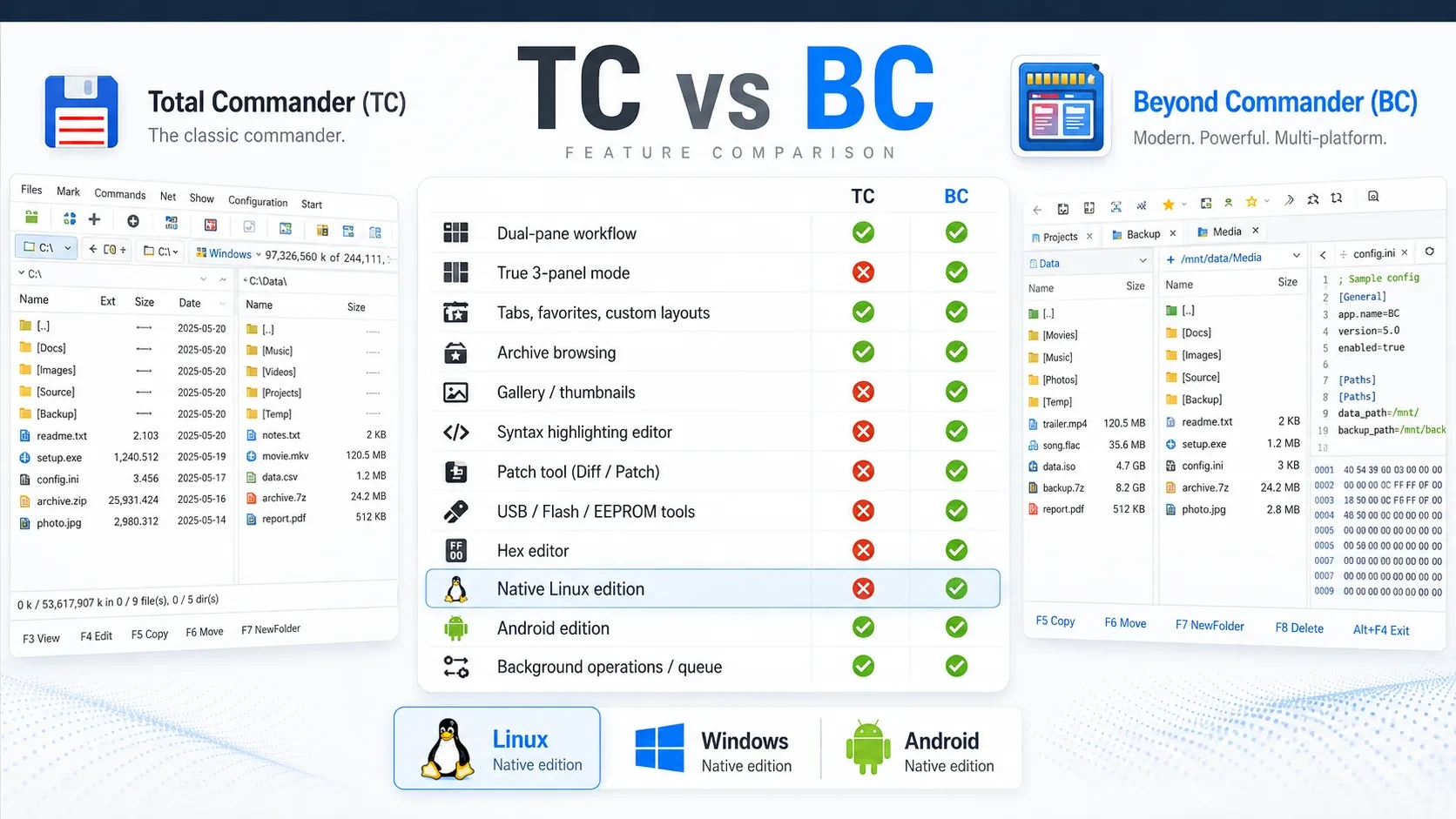
Beyond Commander combines the familiar Commander workflow with modern tools for browsing, searching, comparing, synchronizing and managing files across Linux, Windows and Android.

Dual-pane + optional 3-panel workflow Queue-based background operations Archive browsing & compression Native Linux, Windows and Android editions
Feature comparison between Total Commander and Beyond Commander

What users get

Beyond Commander focuses on fast everyday file management, but also includes the tools power users expect when they work with larger folders, archives, comparisons, remote locations and advanced workflows.

Commander workflowDual-pane file management, classic function-key actions, optional 3-panel layout and productive keyboard use.
Real views and navigationTabs, favorites, saved sessions, folder tree, gallery and thumbnail views, branch view and custom columns.
Serious file operationsQueue Manager, background copy and move, pause/resume, speed metrics, ETA, logs and optional SHA-256 verification.
Built-in toolsViewer, Quick View, compare/sync, terminal, ISO writer, Vault tools, checksums and network places.

Real feature list

The list below focuses on user-facing capabilities already present or integrated in Beyond Commander, without the low-level packaging and developer-only details.

Commander workflow

  • Dual-pane file management with optional third panel
  • F3 Viewer, F4 Edit, F5 Copy, F6 Move, F7 New folder and F8 Delete workflows
  • TC-style and MC-style keyboard behavior profiles
  • Inline rename, slow double-click rename and multi-rename
  • Commander-style selection, marking and drag & drop copy or move

Navigation, tabs and views

  • Tabs per panel with session restore
  • Favorites and pinned folders
  • Detailed, compact and thumbnail views
  • Gallery view, folder tree and folder list
  • Branch view, custom columns and remembered layout state

Search and quick filtering

  • Full recursive search
  • Quick in-panel filtering with Ctrl+S
  • Type-to-jump behavior with configurable modes
  • Case-sensitive and start/end matching options
  • Ignore list for files, folders and path patterns

Copy, move and Queue Manager

  • Background copy and move operations
  • Queue Manager with running, waiting and completed tasks
  • Pause, resume, retry and cancel support
  • Progress, speed, average, min/max and ETA indicators
  • Operation logs and optional SHA-256 verification after copy

Viewer, editing and Quick View

  • Built-in F3 Viewer
  • Quick View in the opposite panel with live cursor tracking
  • Text, source, script and configuration file preview
  • Syntax highlighting and image preview integration
  • Internal or external editor choice

Compare, diff and synchronize

  • Directory comparison between the two panels
  • Compare by size and time, with optional SHA-256 checking
  • Folder synchronization with left-to-right, right-to-left or two-way preview
  • Side-by-side text diff with change navigation
  • Patch save and patch apply support, plus binary hex-based comparison

Archives and compression

  • Browse archives like folders
  • ZIP, 7z, RAR and tar-family format support
  • Lazy browsing for large archives and targeted extraction when needed
  • Extract entire archives or only selected items
  • Create ZIP, 7z, RAR, TAR, TGZ, TBZ2, TXZ, ZST and LZMA archives

Network and remote access

  • Network Places panel and saved remote locations
  • Quick Connection workflow
  • SMB / UNC browsing and network drive handling
  • FTP sessions with live log view
  • Remote browsing support on platforms where the integration is available

Terminal and built-in tools

  • Built-in command line and full terminal view
  • ISO / IMG writer and mount helpers
  • Vault / secure storage tools
  • Checksum generation and verification
  • Drive, storage and file-list helper tools

Customization and platform support

  • Light and dark themes with configurable selection colors
  • Custom button bars, drive bars and view settings
  • Configurable icons, fonts, thumbnails and zoom
  • Built-in help and multi-language interface
  • Native Linux desktop, native Windows and separate Android editions
Available on multiple platforms
Windows, Linux and Android editions are active. The Pro page highlights planned Android power-user extras, while macOS remains on the roadmap.
Windows Active! 🐧 Linux Active! Android Active! macOS Coming!